Body Temperature・Fever Tracker
- 2.4
- Rating
- 1.00M
- Installs
- Free
- Price
 Analysis by App-foxy
Body Temperature・Fever Tracker is the kind of medical app that seems simple until you need a clear record of how you have been feeling over several days. I tested it as a personal fever and symptom diary, and my first impression was practical rather than exciting: it gives a health concern a place to be recorded instead of leaving everything in memory, scattered messages, or notes on paper. That basic purpose is also its main test. A temperature log is useful only when I keep using it, so the real question is whether this app earns a lasting place on my phone after the first week.
Developed by Firehawk, the app is free to install and sits in the medical category. It is suitable for everyone, runs on Android devices starting with version 5.0, and has reached over a million installs. Its current version is 4.2.4. Those details make it accessible to a wide range of people, although the presence of optional purchases from $0.99 to $279.99 for an item means I would still check the purchase screen carefully before committing to any extras.
What using it feels like beyond the first few days
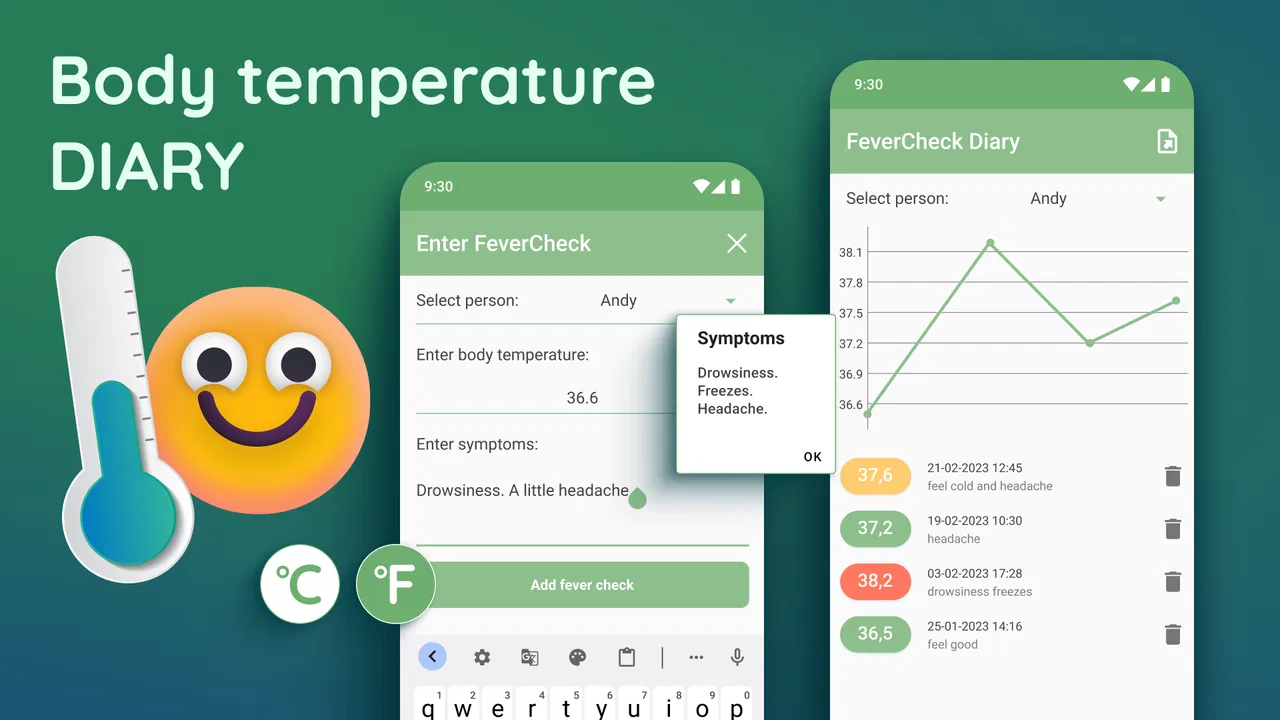
The first-week appeal comes from having one focused place for body temperature, symptoms, and personal contacts. When I feel unwell, I do not necessarily need a complicated health platform. I need to remember when a temperature changed, what symptoms appeared alongside it, and who I had been in contact with. The app’s combination of fever tracking, a symptom diary, and a contact diary gives those related details a shared context.
You May Also Like

 Blood Strike: 2.5 Anniversary
Blood Strike’s Loadouts Turn Every Drop Into a Tactical Gamble
A close look at Blood Strike’s custom loadouts: how fast access to signature weapons reshapes its battle royale rhythm, rewards preparation, and narrows the gap between fights.

 Pandora - Music & Podcasts
Pandora’s Music Is Easy to Start, but Harder to Recover
Pandora’s strength is its low-effort path from a seed to a station. Its weak spot is how much confidence it asks you to place in connection, setup, and quiet recovery.

 8 Ball Pool
 Is Built on Rivalries, Rematches, and Routine
A close look at the rivalries, rematches, shared routines, and unanswered safety questions that turn a quick pool match into a persistent mobile community.

 Samsung Music
’s Quiet Strength Is Playing What You Already Own
Its reach comes less from spectacle than from dependable access to a personal library. That simplicity is both the app’s strongest retention engine and its ceiling.

 AccuWeather: Weather Radar
AccuWeather Review: A Quick, Clear Forecast for Everyday Decisions
For everyday plans, the best forecast is the one you can understand quickly. AccuWeather makes rain timing, radar, and local conditions easy to act on, with a few trade-offs.

 Hill Climb Racing
Why Hill Climb Racing Still Turns Crashes Into One More Run
A tiny car, a bumpy hill and one more upgrade: Hill Climb Racing keeps resurfacing because its simple chaos makes every near-miss feel personal.
More From Our News Desk



That combination is more useful than a bare temperature list. A number without timing or symptoms can be difficult to interpret later. By recording the surrounding situation, I can build a clearer account to discuss with a healthcare professional or compare with how I felt the previous day. I would not treat the entries as a diagnosis, but I would find them helpful when my memory becomes unreliable during an illness.
A realistic example is a short illness that begins late in the evening. I might take my temperature, note a sore throat or headache, and record a recent contact while the details are still fresh. The next morning, another entry can show whether the situation feels stable or different. If I later need advice, the diary gives me a more organized starting point than “I think it began a few days ago.”
One of the less obvious strengths is the contact diary. Many health apps stop at symptoms, while this feature encourages me to connect the illness record with everyday circumstances. I can use it as a private reminder of people or situations to consider if symptoms develop. The trade-off is that contact information is sensitive, so I would keep entries brief and purposeful rather than turning the app into a complete address book.
The app can also be useful for someone caring for another person, provided the user is disciplined about identifying whose information is being recorded. A parent, partner, or caregiver may want a consistent timeline instead of relying on several people’s recollections. I would not use it as a substitute for professional monitoring when someone is seriously ill, but it can make an ordinary home observation routine less chaotic.
During the first week, the main habit is straightforward: open the app when taking a temperature, add the relevant symptoms at the same time, and update the contact diary only when there is a meaningful reason. That last point matters. If I try to document every minor detail, the process becomes tiring quickly. The app rewards selective recording more than constant recording.
Its average rating is 2.5 from around 6,800 ratings, with 146 written reviews. I read that as a warning to keep expectations realistic. The concept is useful, but usefulness depends heavily on how smooth the routine feels on a particular device and whether the available functions match what I personally need. Popularity, shown by its install base, does not automatically mean that every user will find the experience comfortable.
Turning scattered observations into a useful timeline
The best way I found to use the app is to treat each entry as a small piece of a timeline, not as an isolated measurement. I would record the time, the temperature, the main symptom, and a short note about anything relevant. This prevents the common mistake of filling the diary with vague comments that are impossible to compare later.
A helpful workflow is to make entries at consistent moments rather than whenever I happen to remember. For example, morning and evening checks may be easier to sustain than an ambitious schedule that soon disappears. The app does not make the habit valuable by itself; it simply gives the habit a stable destination. If I already own a thermometer, the app works as the record around that device rather than replacing it.
Another useful trade-off is detail versus speed. A long note may feel thorough, but a short, repeatable entry is more likely to continue for a full illness. I would use fuller notes when something changes, such as a new symptom or an important contact, and keep routine entries concise. That approach preserves the information that may matter without making every check feel like paperwork.
For a person who wants automatic readings from a connected thermometer, a specialized device companion may be a better choice. Body Temperature・Fever Tracker is more appropriate when I am comfortable entering observations myself and want temperature, symptoms, and contacts in one diary. That distinction is important: this is a tracking tool, not a replacement for measuring equipment or clinical judgment.
Where the month-to-month value comes from
Long-term value is less obvious than first-week value because most people do not need a fever diary every day. I would not expect to open it as part of a permanent wellness routine unless recurring illness, caregiving, or health appointments made that useful. Its lasting role is more seasonal and situational: it can remain installed so that it is ready when a short-term need appears.
That can still be worthwhile. Removing an app after every illness means reinstalling it when I am tired, searching for the right tool, and rebuilding a system from scratch. Keeping one familiar diary available reduces that friction. The app earns its space not through daily entertainment, but through being a prepared reference when symptoms make ordinary organization harder.
It may also help users who experience repeated episodes and want to compare their own notes over time. I would be careful not to interpret patterns as medical conclusions, but a consistent record can help me ask better questions at an appointment. The value is therefore indirect: the app can improve the quality of the conversation without pretending to provide the answer.
The contact diary adds recurring value when a user wants to remember exposure-related details during a period of illness. It is not something I would update every month, but it can become useful again whenever symptoms and recent interactions need to be considered together. This makes the app more than a single-purpose thermometer log, while also creating an extra maintenance responsibility.
Compared with a general notes app, this product offers a more focused structure for a health episode. A notes app may be faster for a single sentence, but it can become messy when temperature, symptoms, and contacts need to be reviewed together. Compared with a full health-record platform, this app feels narrower and potentially easier to approach, but it will not satisfy someone looking for broad medical records, appointment management, or synchronized care information.
Compared with a paper diary, the phone-based option is easier to keep nearby and search through, while paper can feel more private and less distracting. Compared with a spreadsheet, the app is less flexible but avoids designing columns and formulas. I would choose the app when I want a ready-made, illness-focused routine; I would choose a spreadsheet when I need custom analysis and already enjoy maintaining one.
The maintenance burden is small, but not invisible
The main maintenance burden is behavioral. I have to remember to open the app, enter the information, and keep the entries consistent. That sounds minor, but fever and fatigue are exactly the conditions in which routines break down. A tool that depends on repeated manual input must be judged by how much effort I can realistically give it when I feel unwell.
I would prepare the routine before I need it. That means deciding what I will record, keeping the thermometer accessible, and avoiding a template so elaborate that I abandon it. The strongest practical tip is to define a minimum entry: temperature, time, and one short symptom note. Additional context can be added only when it changes the picture.
The app’s free entry point makes experimentation easy, but optional purchases deserve attention. The listed range extends from $0.99 to $279.99 per item, which is a very wide span. I would not assume that every useful function is included without checking the purchase details inside the app. Anyone setting this up for a family member should also be especially careful around confirmation screens and recurring commitments.
Because the app handles health observations and personal contacts, I would keep the phone protected and avoid entering unnecessary identifying details. Even when an app is convenient, a diary containing symptoms and contact information should be treated as private. My practical approach would be to record only what helps with the health timeline and leave out unrelated personal information.
There is also a maintenance question after an illness ends. I would review the entries while they are still relevant, then decide whether to keep the record for a future appointment or remove details that no longer serve a purpose. Leaving old, incomplete entries mixed with current ones can make the diary harder to read. A short cleanup after recovery helps preserve its usefulness for the next episode.
Why the novelty can fade
The first few entries feel satisfying because they create order quickly. After that, the novelty fades because the app does not turn recording into a rewarding activity. That is not necessarily a flaw for a medical utility, but it means users who expect reminders, automation, or a polished wellness dashboard may feel disappointed.
Manual entry is the biggest source of fatigue for me. If I forget one measurement, the timeline becomes less complete. If I enter information at inconsistent times, comparisons become less meaningful. The app can store what I provide, but it cannot correct gaps created by an unrealistic routine. This is why I would use it for focused episodes rather than promise myself an elaborate permanent health journal.
The contact diary can also become burdensome if I treat it as a full record of everyone I meet. Its value comes from relevance, not volume. I would add only contacts or situations that I may genuinely need to remember, keeping the list manageable and reducing the amount of sensitive information stored.
Another possible frustration is the gap between tracking and action. Recording a worsening symptom does not automatically tell me what to do. For urgent or severe symptoms, I would seek medical advice rather than waiting for the diary to reveal a pattern. This app is best used to support observation and communication, not to delay care or replace a clinician.
Users who want a complete medical history may also outgrow it. The focused design is helpful for fever episodes, but it is not the same as a broad personal health record. Someone managing several conditions, medications, appointments, or laboratory results may be better served by a more comprehensive system. In that situation, this app could be a small supplementary diary, not the central health tool.
Who should keep it installed
I would recommend keeping Body Temperature・Fever Tracker installed if you regularly care for someone, need a simple way to document short illnesses, or want a ready-made place for temperature and symptom notes. It is particularly suitable for people who prefer a dedicated interface over building their own note template. The contact diary makes it more relevant for users who want health observations and recent interactions considered together.
I would skip it if I need automatic thermometer integration, advanced medical analysis, or a complete health-record system. I would also skip it if I know I will not manually enter information. In that case, the app may look useful during setup but provide little value when the illness actually arrives. A simpler note, a device-specific thermometer app, or a broader health platform may fit better depending on the workflow.
My most practical recommendation is to test the routine during a healthy period without inventing data: open the app, decide how you would record a real measurement, and see whether the process feels quick enough. That small trial reveals more than the feature list. If entering a basic observation already feels awkward, the friction will probably feel worse when you have a fever.
After using it, I see the app as a focused utility rather than a daily wellness companion. Its recurring value comes from readiness and continuity, not from constant engagement. The combination of temperature, symptoms, and contacts gives it a clearer purpose than a blank notes page, while the manual nature of the process limits how ambitious I would be with it.
My final view is cautiously positive. Firehawk has made a free medical app that can help turn a vague illness memory into a more useful record, and the Everyone age rating plus Android 5.0 support make it approachable. At the same time, the modest average rating, manual maintenance, possible purchase costs, and lack of a clear role for everyday healthy users mean it will not suit everyone. Its lasting space on my phone is justified only when I value a ready-to-use fever diary more than automation or a full medical platform.
For me, that is enough to keep it available for short-term illness tracking and caregiving, but not enough to make it a daily habit. Used with sensible limits, concise entries, and professional medical advice when symptoms are serious, it can be a practical record keeper. Used as a diagnostic tool or an over-detailed permanent journal, it becomes more work than it is worth.
FAQs for Body Temperature・Fever Tracker
01How accurate is the Body Temperature・Fever Tracker app?
The Body Temperature・Fever Tracker app provides fairly accurate readings when used correctly. It is important to note that it relies on user input and other health data to estimate body temperature trends. While it can help track changes, it should not replace professional medical devices or advice from healthcare providers.
02Can the app diagnose fever or other medical conditions?
No, the app cannot diagnose fever or any medical conditions. It is designed to keep track of body temperature readings and identify patterns over time. For any medical concerns or symptoms, consulting a healthcare professional is essential for an accurate diagnosis and appropriate treatment.
03Is my data safe and private when using the app?
The app prioritizes user privacy and employs encryption to secure data. Personal information and temperature logs are stored locally or securely in the cloud, depending on user preference. It's important to review the app's privacy policy to understand how data is handled and ensure it aligns with your privacy expectations.
04Can the app be used for tracking temperature in children?
Yes, the app can be used to track the temperature of children. Parents can create separate profiles for each child to monitor their temperature trends. However, it's crucial to use a reliable thermometer to input accurate readings and consult a pediatrician if there are any health concerns.
05Does the app require any additional devices or hardware?
The app itself doesn't require additional devices, but it needs accurate input from a digital thermometer. Users must manually enter temperature readings. Some apps might offer compatibility with smart thermometers, providing automatic syncing of data for enhanced convenience and accuracy.
Pros
- Easy-to-use interface for tracking temperature.
- Detailed graphs for visualizing trends.
- Customizable alerts for fever management.
- Syncs with health apps for comprehensive data.
- Supports multiple user profiles.
Cons
- Limited functionality without premium features.
- Occasional syncing issues reported by users.
- Ads can be intrusive in the free version.
- Requires manual data entry for accuracy.
- Limited integration with non-supported devices.

Body Temperature・Fever Tracker
Gallery